Home / Features / Picking and editing
Picking, highlight and editing
A tap resolves to the exact instance and the exact triangle it landed on, and the object highlights itself. There is no picking render pass, no ID buffer readback and no separate highlight render path — which is why picking works identically on all four backends.
How a pick resolves
ObjectPicker is a panel. Add it to the scene, register
the controls that should be pickable, and drive it once per frame. Every pick runs
the same three steps on the CPU:
Picking.ScreenPointToRayturns the pointer position into a world ray, using the camera andExtendResolution.- Each registered target does a broad-phase oriented-bounding-box test, cheap enough to reject almost everything.
- Survivors run an exact triangle test against their pick geometry. The hit distance is the world-space distance to the nearest triangle, and the nearest hit across all targets wins.
Because the final test is triangle-accurate, clicking through the hole in a doughnut
does not select the doughnut. Picking uses
LocalBoundsRaw, not the inflated culling bounds, so a
pick never hits the empty air around an animated character.
 Picking · Highlight
picker = new ObjectPicker();
AddPanel(picker);

picker.Targets.Add(house);            // Mesh3DBase: Model or Mesh3D
picker.Targets.Add(robot);
picker.InstancedTargets.Add(rocks);   // InstancedMesh3DBase: per-instance hits
Registration is opt-in. Ground, walls, sea and skybox should stay out of
Targets, or they will swallow clicks meant for the things
standing on them.
Update the picker last. Both the ray test and the highlight fit read the
final world matrices for the frame, so
picker.Update has to run after every panel holding a
target has updated.
Hover, click, lock
Hover is immediate and stateless: move onto a target and it highlights, move away and it stops. A click locks the target instead, and a lock survives the pointer leaving.
| Gesture | Result |
|---|---|
| Pointer over a target | Hover highlight. Selected reports the hit. |
| Click on a target | Locks it. Mesh3DBase.Selected or MeshInstanceTransform.Selected is set to true. |
| Click on another target | Switches the lock. The previous target's highlight is cleared in the same frame. |
| Click on empty space | Clears the lock. |
| Click inside the property board | Deliberately does not clear the lock. That rectangle counts as panel interaction. |
A click is a release within 20 pixels of the press point —
TouchService.IsReleased. Anything further is a drag and does
not change the selection, which is what lets a camera orbit start on top of an object. Touch
screens have no hover, so a press picks and a release lets go; the same code path serves
both.
Highlight is a property of the object
The picker does not draw anything. It writes into
Highlight on the target, and the target renders its own
highlight during its own draw. The panel owns no GPU resources at all.
HighlightStyle | Result |
|---|---|
None | Nothing is drawn, but selection and the property board still work. The right answer for a 150 m grass field, where a bounds box would fill the screen. |
Bounds | World-space AABB fitted to the raw bounds: translucent faces plus solid dual-colour edges. The default, and clear on small and medium models. |
Wireframe | Surface-fitted shell and edge strips. Avoids giant boxes on large models. The shell is built lazily on the first enabled frame, stays resident afterwards, and costs nothing while globally disabled. |
Outline | Screen-space contour with its own colour and pixel width. Does not pulse. |
robot.Highlight.Style = HighlightStyle.Outline;
robot.Highlight.OutlineColor = new Vector4(1f, 0.84f, 0.25f, 1f);
robot.Highlight.OutlineWidth = 3f;

// Or opt a large background body out entirely:
grass.Highlight.Style = HighlightStyle.None;
Colours, and when the picker overrides them.
SurfaceColor,
EdgeColor and
OutlineColor exist both on the picker and on each target. The
picker's values are fallbacks: they are applied only while the target still holds
the untouched default. Set a colour on the target and it keeps it, including a change made
at runtime.
| Setting | Default | Notes |
|---|---|---|
PulsePeriod | 1.2 s | One full rise and fall of the triangle wave. |
BoxAlpha | 0.3 | Peak face alpha. Written into SurfaceColor.W every frame. |
SurfaceColor | white, 0.3 | Face colour for Bounds and Wireframe. W = 0 degrades Wireframe to edges only. |
EdgeColor | orange | Solid; does not pulse. |
OutlineColor | bright gold | Solid; does not pulse. |
The target's own Alpha is never touched. Highlighting is
additional geometry, not a modification of the object, so a highlighted model still looks
like itself. All three channels are cleared before anything is written, which is why
switching style at runtime never leaves a stale box behind.
The screen-space outline is the one style that needs a pass of its own: the conditional
OutlineMask pass between the AfterScene compute phase and
Post. All four backends implement it, and on a frame where nothing asked for an outline
the backend early-outs before allocating the mask target, so the pass is free when
unused. See the render pipeline.
Reading the selection
A pick can land on a whole object or on one instance inside an instanced host, and the API keeps those cases distinguishable rather than flattening them.
| Member | What it reports |
|---|---|
Selected | The focused Mesh3DBase, or null when there is no hit or the focus is an instance. |
SelectedInstance | The focused MeshInstanceTransform. Non-null only for a per-instance hit. |
SelectedHost | The owning control either way. Null means nothing is focused. |
Locked, LockedInstance | The same split for the click-locked focus, which ignores hover. |
SelectedFocus | The Focus struct itself: host plus optional instance, with IsEmpty. |
Select(target) | Locks a target from code — for something you just spawned. Registers it if needed. |
A locked focus is re-validated every frame: the host must not be disposed, and an instance
must still be present in its host's list. Rebuilding an instance list at runtime therefore
drops the selection instead of leaving a dangling reference. If you call
Select yourself, call it after click consumption for the
frame, or the click branch can overwrite the lock you just set.
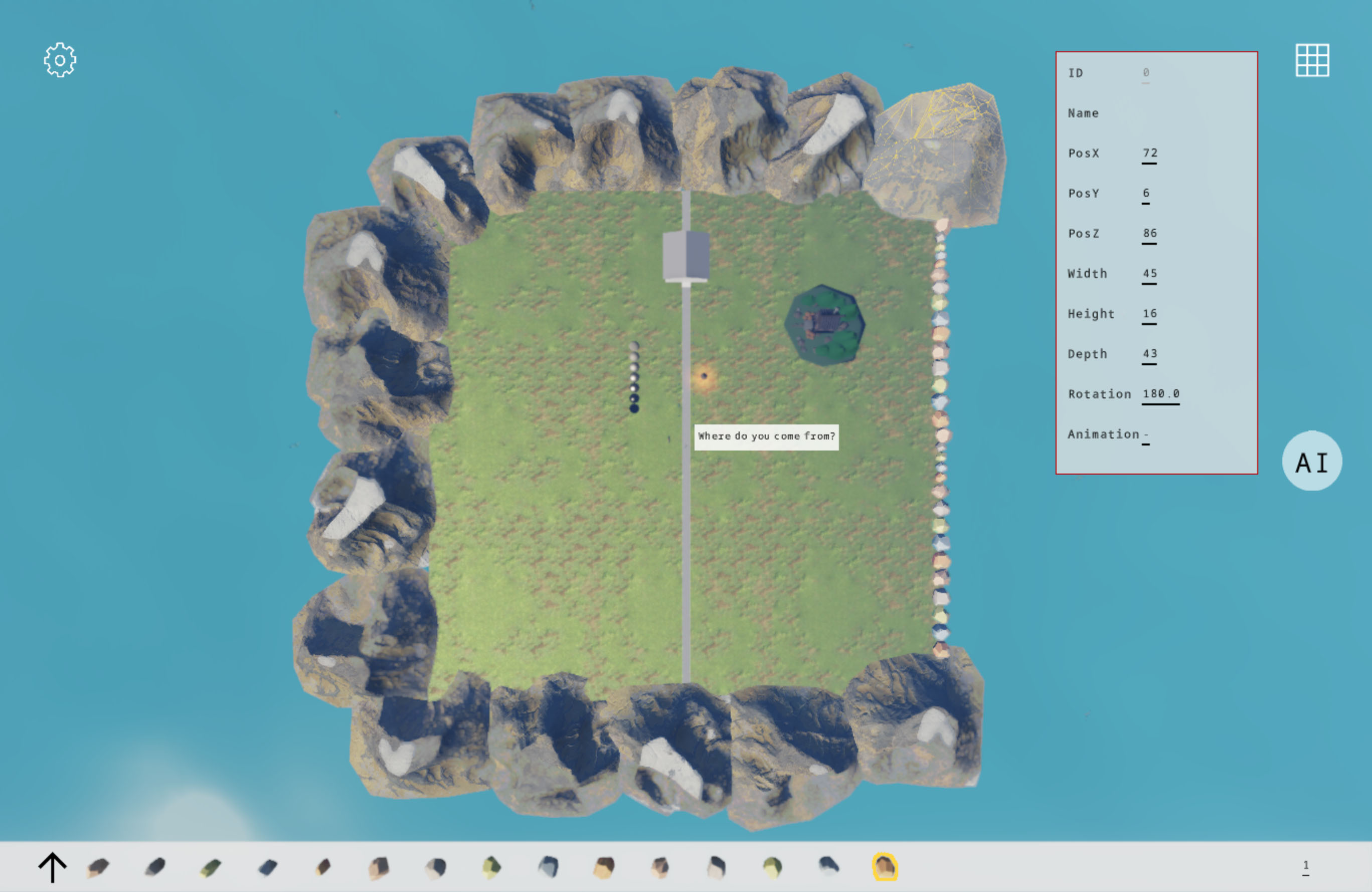
The property board
ObjectPanel ships with the picker. When something is locked it
shows the focus and makes PosX,
PosY, PosZ,
Width, Height,
Depth and rotation editable in place, plus the current
animation clip and its index for anything that has clips. Targets without animation show a
dash rather than an empty row.
Rotation is edited in degrees, normalised to [0, 360), and written back
in whatever form the target uses — radians around Y for
Model, a Y-axis quaternion for
Mesh3D and instances. Yaw is recovered from a quaternion by
rotating local +X and taking atan2(-z, x), which is exact for
pure Y rotations.
The rotation pivot is the anchor, and the anchor is the geometric centre of the
raw bounding box. Since the world matrix always maps that anchor to
PosX/PosY/PosZ, an object rotates around its own centre
and neither its position nor its size changes. This is the one payoff of the uniform
placement contract that is hard to appreciate until you have used an engine without it.
The board is a normal Panel built from
Texts, Shape and
FrameButton. If it is not the editor you want, it is roughly
two hundred lines to replace, and the picker exposes everything it reads.
Known gaps
- Absent No transform gizmo. Editing happens through numeric rows on the board, not by dragging arrows in the viewport.
- Absent Single selection only. One focus at a time. No rubber-band select, no multi-object transform.
- Absent No undo, and no persistence. Edits apply to live objects. Writing them back to a scene file is your job, because the engine has no scene file format.
-
Absent
2D controls are out of scope. Sprites and text are hit-tested by their
own rectangles through
OnClick; the picker deals only withMesh3DBaseandInstancedMesh3DBase.