Home / Features / Sky and atmosphere
Sky, atmosphere and weather
The sky is computed, not textured. Scattering LUTs feed a full day and night cycle: sun and moon positions, lunar phase, sky colour, ambient irradiance and aerial perspective all derive from one phase value.
What the atmosphere pass produces
SkyAtmosphereEffect runs in the FrameStart compute
phase and publishes five textures. Everything downstream — the sky itself,
fog over distant geometry, ambient light on your models — samples those,
which is why they cannot drift out of agreement.
- Transmittance LUT — how much light survives a path through the air.
- Multiple-scattering LUT — the second-order term that makes a blue sky blue rather than black with a bright band.
- Sky-view LUT — the radiance of the sky in every direction, at 256×128 by default.
- Cloud noise — a 512×512 noise texture the cloud layers sample.
- Aerial-perspective LUT — a 3D volume of in-scattering against distance.
Types to read: Rendering/Atmosphere.cs,
DayNightCycle.cs,
SkyState.cs,
Effects/SkyAtmosphere.cs.
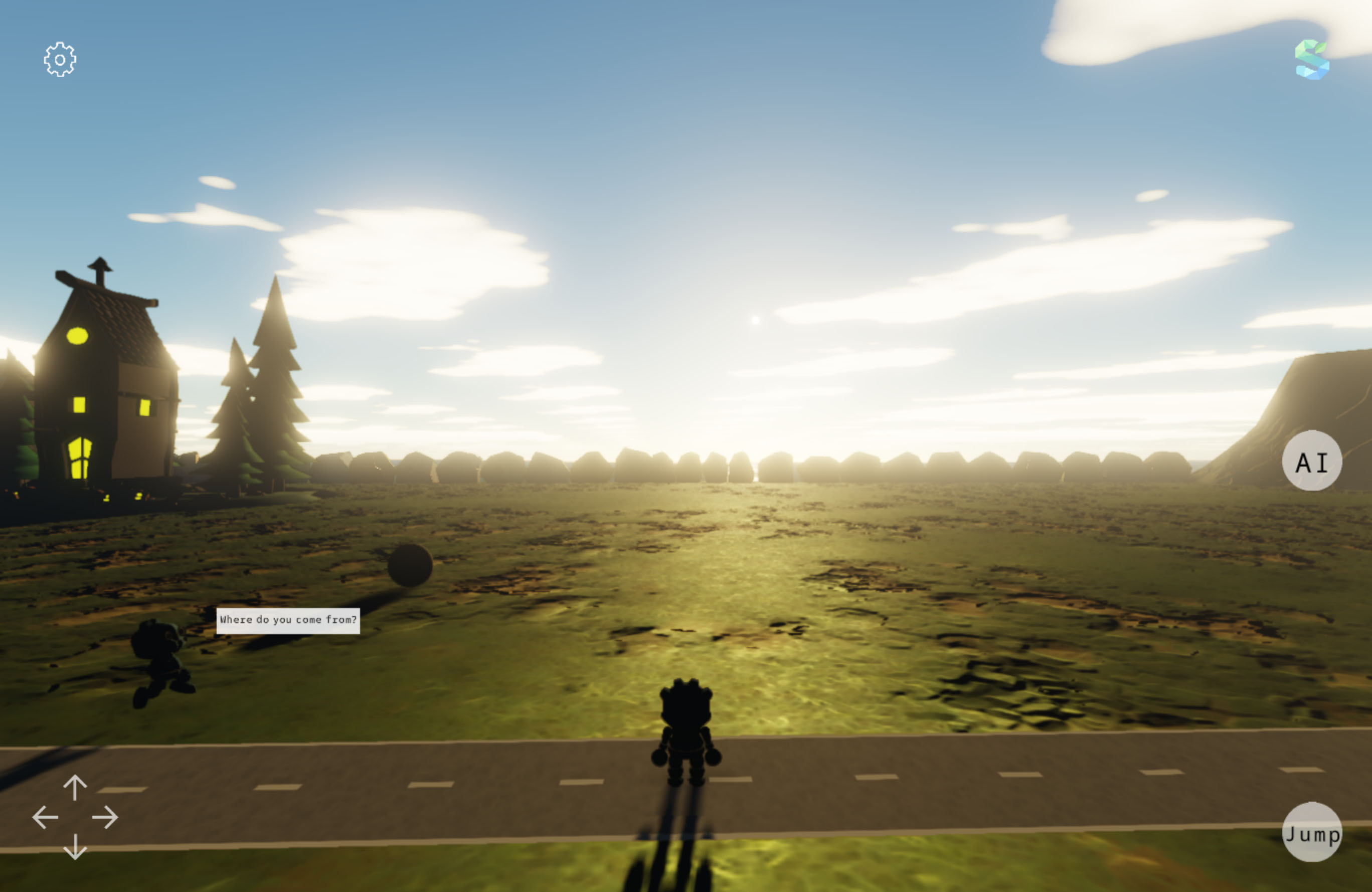 Sky atmosphere
A real planet, in kilometres
The atmosphere is parameterised physically rather than artistically. Defaults describe Earth: a 6360 km ground radius, a 6460 km atmosphere shell, a Rayleigh scale height of 8 km, and a viewer 200 m above the ground.
Field on Atmosphere | Default | Meaning |
|---|---|---|
GroundRadiusKm | 6360 | Planet radius. Shrink it and the horizon curves visibly. |
AtmosphereRadiusKm | 6460 | Top of the atmosphere shell. |
ViewAltitudeKm | 0.2 | Camera altitude fed to the LUTs. |
RayleighHeightKm | 8 | Exponential scale height for molecular scattering. |
MiePhaseG | 0.8 | Forward-scattering anisotropy for aerosols — the glow around the sun. |
GroundAlbedo | 0.1 | How much light bounces back up into the sky. |
MultiScatterGain | 1.0 | Scales the multiple-scattering term. Below 1 gives a harsher, thinner sky. |
Atmosphere is a static class, and that is a deliberate
narrowing too: there is one sky per application, not one per camera or per scene. It keeps
the LUTs to a single set.
Sun, moon and stars
Both bodies are real discs with real angular sizes, which is what makes their shadows and their specular highlights the right size without tuning.
| Field | Default | Meaning |
|---|---|---|
SunIrradiance | 12 | Sun brightness in engine units. |
SunAngularRadiusDeg | 0.2665 | The sun's real angular radius as seen from Earth. |
SunDiskRadiance | 30 | Radiance of the disc itself, separate from its lighting contribution. |
MoonIrradiance | 0.6 | Moonlight contribution. |
MoonAngularRadiusDeg | 0.259 | The moon's real angular radius. |
MoonColor | (0.55, 0.68, 1.0) | Cool cast, because moonlight reads blue to a dark-adapted eye. |
StarRadiance | 0.15 | Star brightness. |
StarVisibilityTwilightDeg | 18 | Sun depression angle at which stars are fully out — astronomical twilight. |
StarRotation, StarPoleAxis | — | Where the sky rotates about, if you want a different latitude or a different planet. |
NightAirglow | 0.004 | Faint emission that keeps a moonless night from being pure black. |
The day and night cycle
DayNightCycle turns one phase value into everything that
depends on time of day. Evaluate is the entry point;
the rest of the class is the conversions you need around it.
// A day takes 100 seconds at the default speed of 0.01.
WorldSettings.DefaultDayNightSpeed = 0.004f;   // slower
WorldSettings.DefaultStartHour = 5.5f;         // just before sunrise

// Anywhere afterwards:
float phase = DayNightCycle.PhaseFromHour(18f); // dusk
float hour = DayNightCycle.HourFromPhase(phase);| Member | What it gives you |
|---|---|
Evaluate | Drives sun and moon direction, tint and ambient for a phase. |
BodyPosition | Direction to the sun or moon at a phase. |
MoonPhaseFactor | Lunar illumination, from a SynodicDays cycle — the moon waxes and wanes over real months. |
SkyTint, AmbientScale | Colour cast and ambient strength through the day. |
StarAngle | Rotation of the star field. |
SunriseHour | When the sun crosses the horizon, for scheduling anything against it. |
CelestialPole | The axis the sky turns about. |
Speed and start hour live on WorldSettings, which reads from
the application's settings object and therefore survives a restart if you persist settings.
Weather: four presets and a lerp
SkyState is a struct holding cloud layers plus the handful of
scalars that make clouds read as weather rather than as texture. Four presets ship, and
Lerp between them is how a front rolls in.
// Hold a settled state:
Atmosphere.Clouds = SkyState.Overcast;

// Or move between two over a minute:
float t = MathF.Min(1f, elapsed / 60f);
Atmosphere.Clouds = SkyState.Lerp(SkyState.Fair, SkyState.Storm, t);| Field | Meaning |
|---|---|
Layers, LayerCount | Up to a few SkyCloudLayer entries, each with its own altitude and wind. |
Albedo | How bright the cloud material is. |
ShadowStrength | How much the cloud deck dims the sun below it. |
PhaseG | Forward scattering within the cloud — the silver lining. |
AmbientFloor | Minimum ambient under heavy cover, so an overcast scene does not go flat black. |
ForwardGain | Extra gain on light scattered towards the viewer. |
Each layer is a SkyCloudLayer:
AltitudeKm,
ThicknessKm,
TileKm,
Coverage,
Density,
Detail and
WindKmPerSec. Wind accumulates into
Atmosphere.CloudWindOffsetKm, so clouds drift without any
per-frame work from you.
Aerial perspective
Distant geometry picks up the colour of the air in front of it, sampled from the aerial LUT. This is the single cheapest thing you can enable to make a scene feel large.
| Setting | Default | Meaning |
|---|---|---|
Sky | Procedural | Sky mode; read at initialization. |
SkyViewLutWidth / Height | 256 / 128 | Sky-view LUT resolution. |
SkyRayMarchSteps | 16 | Steps per LUT ray. The main sky quality/cost dial. |
CloudNoiseSize | 512 | Cloud noise texture edge. |
AerialPerspective | on | Whether the LUT is built and applied. |
AerialMaxDistanceKm | 32 | Distance the LUT covers. Beyond it, the far value is held. |
AerialIntensity | 1.0 | Lerp weight: 1 is physical, higher exaggerates it. |
AerialIntensity above 1 is not a bug fix, it is a
concession to scale. A scene 200 m across gets almost no physical in-scattering; if you
want it to read as a landscape anyway, exaggerate the weight and accept that it is a lie.
Known gaps
- Partial Volumetric clouds. Cloud layers are shaded from a noise texture against a layer model, not ray-marched as a volume. They read well from the ground and do not survive flying through them.
- Absent Precipitation, wind on foliage, wet surfaces. Weather affects light and cloud cover, not the ground.
- Absent Volumetric fog and light shafts. Aerial perspective is per-pixel in-scattering, not a participating medium the sun can shaft through.